Every connection, topic, and ACL — finally under control.The Mosquitto MQTT GUI for Pro Edition.
Live broker telemetry, role-based access, a full audit trail, and a browser MQTT client. Everything you'd otherwise piece together from SSH sessions, log files, and command-line tools — in one production-grade web interface.
Included with all Pro Mosquitto plans • No additional cost • Instant setup
Powering MQTT infrastructure for 200+ enterprise customers worldwide





Why Management Center
Running Mosquitto without a GUI is operating blind.
The CLI Gets You Running. It Doesn't Keep You in Control.
Which clients are connected? Which topics are active? Why did that device drop its session? The answers are somewhere in the logs — if logging is configured correctly, if the right person has SSH access, if they know what to grep for.
Or open the browser and just look.
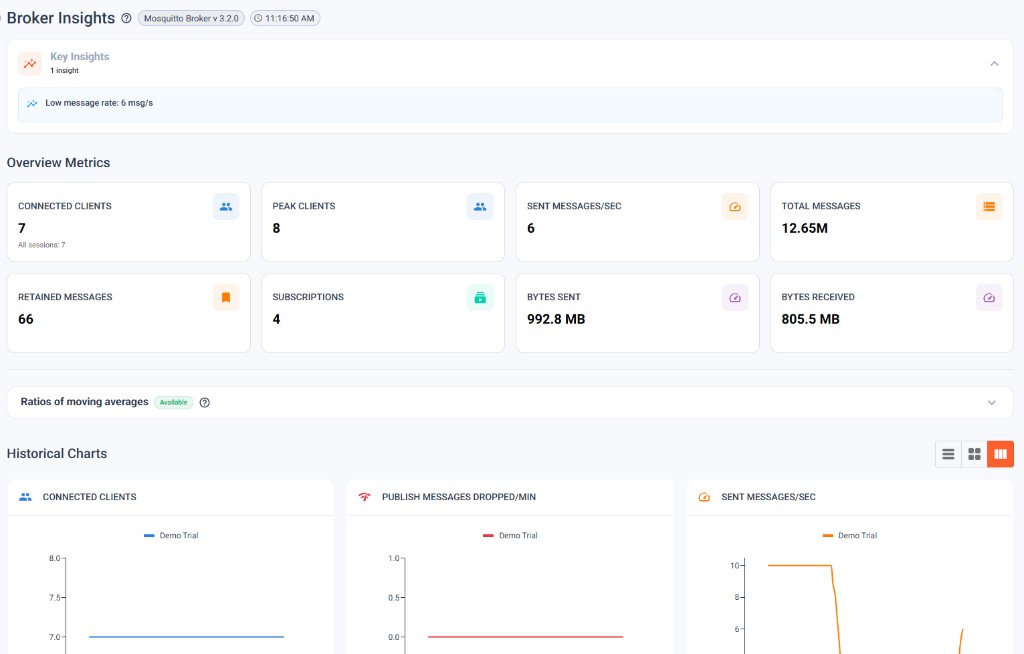
Connected clients, active topics, message rates, cluster health, ACLs, certificates — in one live view. What used to take SSH access, grep skills, and three terminal windows takes one URL and the right role.
1711243891: New connection from 10.0.3.17:52841
1711243891: New client connected from 10.0.3.17:52841 as sensor-gw-04
1711243892: Client sensor-gw-02 disconnected
1711243893: Received PUBLISH (d0, q1, r0 ...
1711243894: Socket error on client edge-node-11
1711243895: New connection from 10.0.3.22:48210
1711243896: Client plc-west-03 has exceeded ...
1711243897: Sending CONNACK to sensor-gw-08
Full visibility from the browser, out of the box.
Product Tour
Click through the actual interface.
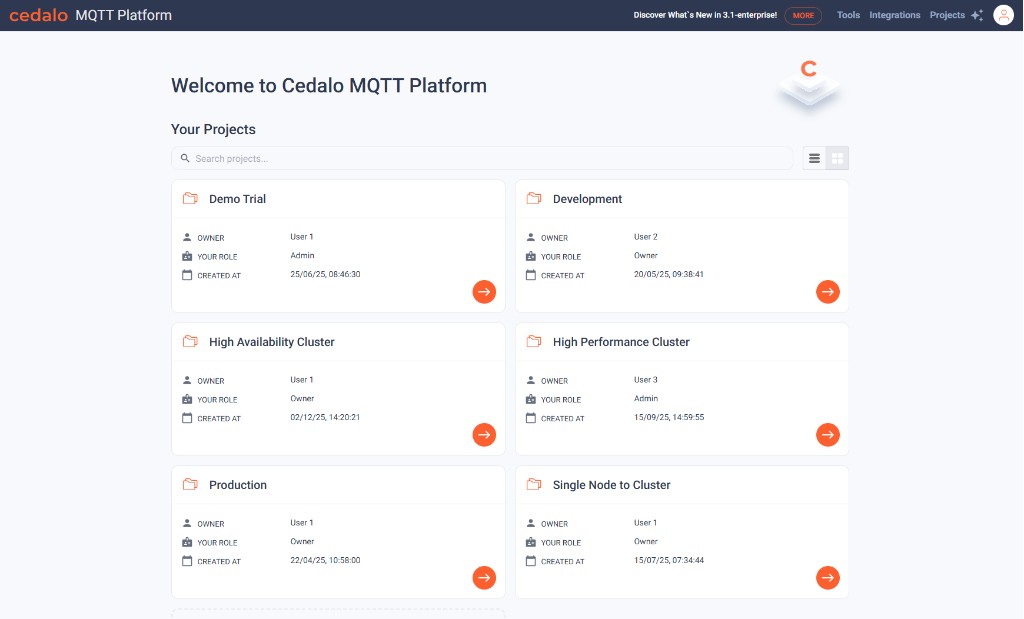
Single-node, HA, and high-performance clusters all live next to each other in the same workspace.
One workspace for every Mosquitto project
Land in the platform and see all your projects — production, staging, HA clusters — with owner, role, and creation date at a glance.
- 1Every Mosquitto deployment in one placeSingle-node, HA, and high-performance clusters all live next to each other in the same workspace.
- 2Roles per projectEach project tracks Owner / Admin / Member separately — onboarding new teammates is a single click.
- 3Jump straight into a brokerThe orange chevron opens the broker view: insights, clients, security, the lot.
Want to try every screen with your own broker?
Simplify MQTT Operations
Real-Time Visibility
Monitor connections, messages, topics, and system metrics in real-time. Instantly identify issues before they impact your applications.
UI-Driven Configuration
Manage security policies, access controls, and broker settings conveniently via dedicated UI forms and wizards.
Team Collaboration
Role-based access control lets your entire team work together. Developers, operators, and security teams all have appropriate access.
Capabilities
Everything you need to run Mosquitto in production.
Run Your MQTT Infrastructure Without Operational Blind Spots
Included with all Pro Mosquitto plans. No additional cost. Instant setup
API & Automation
Run Mosquitto the way you run the rest of your infrastructure.
User & ACL Management
Create clients, assign roles, and update topic permissions via API — integrate access control into your provisioning workflows.
Cluster & Client Control
Query cluster health, inspect connected clients, and disconnect devices programmatically without opening the GUI.
Topic Tree & Streams
Retrieve the full topic hierarchy and manage data streams, including create, update, and replay operations.
Token-Based Auth
Issue and revoke application tokens with role-based scopes and expiration for secure, automated API access.
Authorization: Bearer ••••••
{
  "username": "sensor-i1",
  "clientid": "swg-i1-09",
  "textname": "Sensor site 1",
  "textdescription": "Workshop floor, room 1",
  "roles": [{
    "rolename": "client"
  }],
  "groups": [{
    "groupname": "i1-pub"
  }],
  ...
}
More endpoints
In your week
What you'll actually do with it.
Run it day-to-day
Run the broker without surprises and act fast when something needs attention.
- See live broker state, client connections, message rates, and HA cluster health in one workspace
- Drill into individual sessions, topic traffic, and ACL configurations
- Disconnect rogue clients and manage problematic connections from the UI
- Inspect broker logs and message flows without SSH access
- Track capacity and usage trends with historical charts
Stand up new sites and integrations
Get a new broker, cluster, or bridge from zero to production.
- Set up clients, ACLs, and certificate authorities through the UI or REST API
- Add Azure Event Hubs, InfluxDB, MongoDB, and more integrations without editing config files
- Define project- and role-scoped access for the people who'll operate it
- Validate publish/subscribe, ACL rules, and bridges in the same UI you set them up in
- Verify the topology with the live topic tree and connection inventory
Prove control and compliance
Show auditors, stakeholders, and your own team that the broker is under control.
- Audit trail of broker, security, HA, and bridge operations — shipped to your SIEM via syslog
- Role-based access scoped per project and broker — granular enough for least-privilege
- Centralized identity via SAML, OIDC, or LDAP — no local user stores
- Manage CAs and client certificates — import, deploy, and revoke with audit history
- Backed by Cedalo's ISO 27001, SOC 2 Type II, and EU Cyber Resilience Act compliance
Your Next Steps
Ready to Add Full Visibility to Mosquitto?
Book a slot
Choose a time that fits your team.
Architecture review
We analyze your broker architecture, monitoring gaps, user management, and operational workflows.
Get your deployment plan
Receive a concrete plan for introducing the Management Center MQTT GUI and the Premium version for Eclipse Mosquitto™ MQTT Broker into your existing environment without disrupting operations.
Stop operating Mosquitto blind.
14-day cloud or 30-day on-prem trial · No credit card · Cancel anytime
Side-by-Side
Open-Source Mosquitto vs Pro Mosquitto
Without Management Center
The status quoWith Management Center
The better waySSH & logs only: Broker status requires SSH access and manual log file analysis per instance
Live dashboard & logs in UI: Live dashboard with sessions, clients, and message metrics. Broker logs are viewable from the UI
No topic overview: No central visualization of topic hierarchies
Topic tree: Live topic tree with subscription and traffic visibility
File-based configuraiton: Configuration and client provisioning needs to be performed via flat-file manipulation on the server
UI-driven configuration: Broker configuration is exposed through the UI, providing features such as RBAC with immediate user provisioning and deactivation
CLI-only testing: Local mosquitto_pub/sub tools required for broker testing
Browser MQTT client: Integrated MQTT client directly in the browser
No audit trail: No audit documentation. Compliance prep takes days and a dedicated person.
Audit-ready: Audit logs designed to support ISO 27001 and SOC 2 Type 2 compliance requirements.
Community support only: Community forums are your only support option when your MQTT broker goes down in a critical production environment.
24/7 expert support: 24/7 direct access to the Mosquitto core development team with SLA-backed response times (depending on support tier).